Twitter scheduler for X posts, images, and video
PostQuest is a Twitter scheduler for X accounts. You write the post, add up to four images, a GIF, or a video, and pick a time. PostQuest checks the text against your account’s character limit and the files against X’s media rules before the post is scheduled.
X has two native ways to schedule: the Composer in X Ads, and X Pro, which is part of the Premium+ subscription. PostQuest is for people who want X on the same calendar as LinkedIn, Threads, or Bluesky, or who draft posts with an AI assistant.
- Accounts
- X accounts, free or Premium
- Post types
- Text Post, Image Post, Carousel Post, GIF Post, Video Post
- Caption limit
- 280 characters
- Depends on the account
- Price
- From $15 a month
- Seven-day free trial, no card required
Last verified
What you can schedule on X (Twitter)
PostQuest checks every X (Twitter) post against these limits before it is scheduled. They come from the same rules that power the composer, last checked against X (Twitter)’s API documentation on September 11, 2026.
| Format | Files | Limits |
|---|---|---|
| Text Post | No media | Caption only |
| Image Post | 1 file | Up to 5 MB · JPEG, PNG, WebP |
| Carousel Post | 2–4 files | Up to 5 MB · JPEG, PNG, WebP |
| GIF Post | 1 file | Up to 15 MB · GIF |
| Video Post | 1 file | Up to 8 GB · 0.5 s–20 min · MP4, MOV, WebM |
Captions can be up to 280 characters, depending on the account. Hashtags: no hard limit (recommended: 1–2 hashtags). See every dimension, aspect ratio, and codec on the X (Twitter) post size and specs page.
X Ads Composer and X Pro vs PostQuest
X lets you schedule organic posts from the Composer in X Ads (ads.x.com), and from X Pro, the successor to TweetDeck. X Pro can schedule for several accounts but is only included with Premium+.
| Feature | X Ads Composer and X Pro | PostQuest |
|---|---|---|
| Price | X Ads Composer: needs an X Ads account. X Pro: requires Premium+ | From $15 a month after a seven-day trial with five X posts |
| Where you schedule | The Composer tab in X Ads, or a Scheduled column in X Pro | A calendar shared with your other networks |
| Several accounts | X Pro schedules for each connected account | Several X accounts alongside other networks |
| Formats | Text, photos, videos, and cards | Text, one to four images, GIF, and video posts; threads are not supported |
| Other networks | X only | Nine more, including LinkedIn, Threads, Bluesky, and Mastodon |
| AI assistants | Not part of this comparison | Claude and ChatGPT draft and schedule over MCP, with your approval |
If you only post to X and already pay for Premium+, X Pro covers scheduling. If you don’t, the X Ads Composer works but is built for advertisers. PostQuest fits when X is one of several networks you post to every week.
How to schedule in X Ads Composer and X Pro
- Sign in to ads.x.com and open the Composer tab.
- Write the post and add photos, video, or a card.
- Click the arrow next to Post and choose a date and time.
- Click Schedule. The post stays hidden until that time.
- To edit it, open the Posts tab and switch the filter to Scheduled.
Source: X Help Center: Scheduled Posts; X Help Center: About advanced X Pro features; X Help Center: About X Premium
Which X (Twitter) accounts can you connect?
Connect any X account with permission to post and upload media. The character limit follows the account: 280 characters on a free account and up to 25,000 with a paid subscription.
- X charges PostQuest for each post, so the free trial includes five posts to X. Paid plans have no separate X allowance.
- You can connect several X accounts; each counts as one account on your plan.
- If X revokes access, the account shows Reconnect. Failed posts can be retried once it is reconnected.
How to schedule X (Twitter) posts in PostQuest
Step 1: Connect your X account
Open Connections, choose X, and authorize PostQuest to post and upload media for the account.
Step 2: Write the post
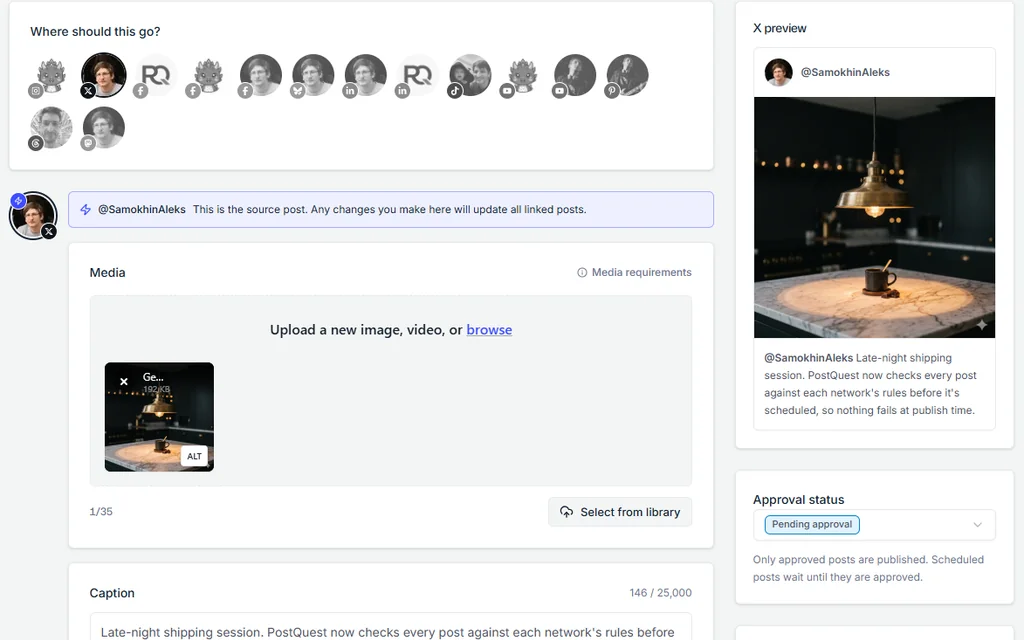
Select the account in the composer. The counter shows the limit for that account: 280 characters on a free account, or 25,000 on a paid one. Once you add media, an X preview shows how the post will look.
Step 3: Add images, a GIF, or a video
Attach one to four images, one GIF, or one video. Images and video can’t be mixed in the same post.
Step 4: Check the requirements
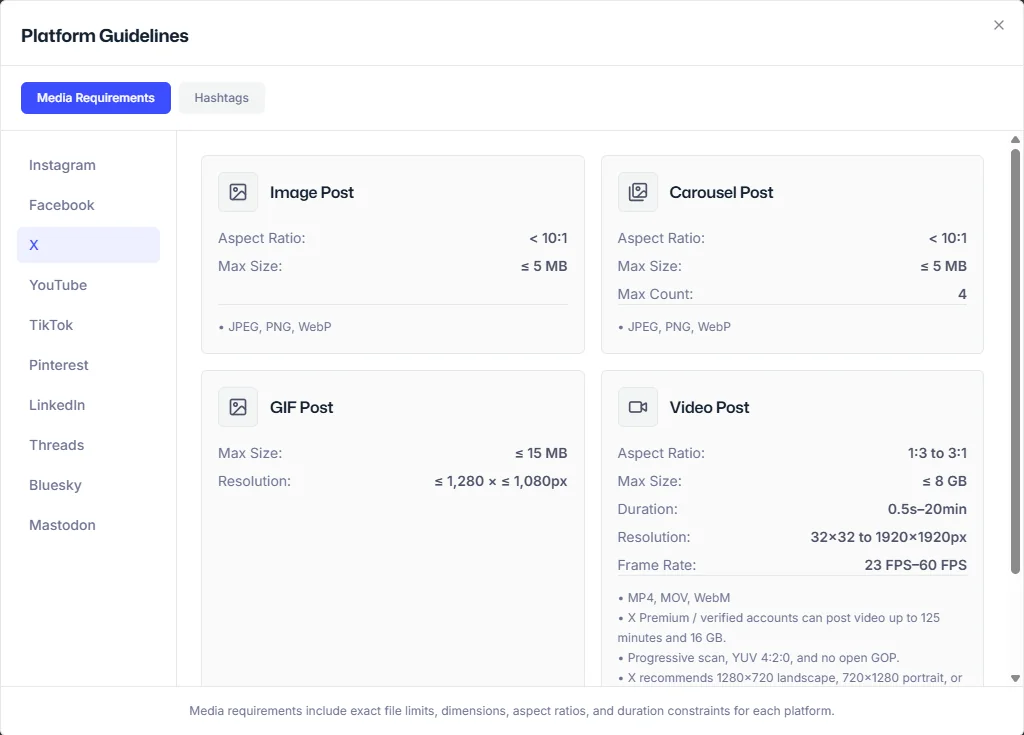
Open Media requirements to see the X limits PostQuest checks: image size and format, GIF size and resolution, and video length, resolution, and frame rate.
Step 5: Choose a time and schedule
Pick a date and time and click Schedule. On the trial, each post to X uses one of your five X posts when it is first scheduled.
Schedule X (Twitter) posts from Claude or ChatGPT
Connect PostQuest to Claude or ChatGPT over MCP and ask for posts in plain language. The assistant creates drafts by default; scheduling, publishing, and deleting need your explicit approval.
“Draft three X posts from this changelog, each under 280 characters, and save them as drafts.”
“Make a LinkedIn version of my latest X draft for the PostQuest Page and validate both.”
“Schedule the approved X post for 8 a.m. tomorrow London time.”
Why a X (Twitter) post fails, and how to fix it
PostQuest catches these before scheduling, so you fix them in the composer instead of finding a failed post later.
- Over 280 characters on a free account
- Free X accounts post up to 280 characters. Shorten the X version; the longer captions for your other networks stay as they are.
- Five or more images
- An X post takes up to four images. Pick the strongest four or split them across two posts.
- An image over 5 MB
- X images must be JPEG, PNG, or WebP and 5 MB or smaller. GIFs can be up to 15 MB.
- Mixing a video or GIF with images
- A multi-image post can only contain images. Post the video or GIF on its own.
- The trial’s X posts are used up
- The trial includes five posts to X. Upgrade to keep posting to X, or remove X from the post and schedule it to your other networks.
Pricing
Every plan includes all ten networks, the calendar, pre-publish checks, the public API, and the MCP connection for Claude and ChatGPT. Start with a seven-day free trial; no card required.
Solo
$15 / month
or $150 billed yearly
8 connected accounts, 1 workspace
Pro
$29 / month
or $290 billed yearly
20 connected accounts, 3 workspaces
Agency
$69 / month
or $690 billed yearly
60 connected accounts, 15 workspaces
X (Twitter) scheduler FAQ
Is there a free Twitter scheduler?
Yes. The Composer in X Ads (ads.x.com) schedules organic posts at no charge once you have an X Ads account. X Pro also schedules posts but needs Premium+. PostQuest has a seven-day trial with five X posts and no free plan.
Can I schedule X threads?
No. PostQuest schedules single X posts with text, images, a GIF, or a video. To publish a thread, write it on X or in X Pro. If you have a paid X subscription, one long post of up to 25,000 characters is an alternative.
Does PostQuest support long posts for X Premium accounts?
Yes. PostQuest reads the character limit from the connected account, so a paid account can schedule posts up to 25,000 characters while a free account stays at 280.
Why does the free trial limit posts to X?
X charges PostQuest for every post published through its API, so the trial includes five posts to X out of its 20 posts in total. Paid plans don’t have a separate X allowance.
Can Claude or ChatGPT schedule tweets for me?
Yes. Connect PostQuest to Claude or ChatGPT over MCP and the assistant can draft X posts, check them against your account’s limits, and schedule them once you approve. It can’t publish without your confirmation.
Keep planning
- X (Twitter) image and video specs for every format PostQuest publishes.
- The best time to post on X (Twitter), based on published engagement studies.
- Connect Claude to PostQuest to draft posts from a conversation.
Schedule your first X (Twitter) post
Connect X (Twitter), write once, and let PostQuest check the post before it goes on the calendar.