LinkedIn post scheduler for profiles and company Pages
PostQuest is a LinkedIn post scheduler for personal profiles and company Pages. You write the post, attach photos, a video, or a document, and choose when it publishes. PostQuest checks the text and files against LinkedIn’s limits before the post is scheduled.
LinkedIn has its own scheduler, and for one profile it works well. PostQuest is for people who run a profile and a Page together, post the same idea to other networks, or want to schedule post types LinkedIn’s Page scheduler doesn’t support, such as multi-image posts.
- Accounts
- Personal profiles and company Pages
- Post types
- Text Post, Link Post, Photo Post, Multi-Image Post, Video Post, Document Post
- Caption limit
- 3,000 characters
- Price
- From $15 a month
- Seven-day free trial, no card required
Last verified
What you can schedule on LinkedIn
PostQuest checks every LinkedIn post against these limits before it is scheduled. They come from the same rules that power the composer, last checked against LinkedIn’s API documentation on September 11, 2026.
| Format | Files | Limits |
|---|---|---|
| Text Post | No media | Caption only |
| Link Post | No media | Caption only |
| Photo Post | 1 file | Up to 8 MB · JPEG, PNG |
| Multi-Image Post | 2–20 files | Up to 8 MB · JPEG, PNG |
| Video Post | 1 file | 75 KB–500 MB · 3 s–30 min · MP4 |
| Document Post | 1 file | Up to 100 MB · PDF, DOC, DOCX, PPT, PPTX |
Captions can be up to 3,000 characters. Hashtags: no hard limit (recommended: 3–5 hashtags). See every dimension, aspect ratio, and codec on the LinkedIn post size and specs page.
LinkedIn’s built-in scheduler vs PostQuest
LinkedIn lets you schedule posts from the composer with the clock icon. Profile posts can be scheduled between 10 minutes and three months ahead. Page posts can be scheduled between one hour and three months ahead by super admins and content admins.
| Feature | LinkedIn’s built-in scheduler | PostQuest |
|---|---|---|
| Price | Free | From $15 a month after a seven-day trial |
| Scheduling window | Profiles: 10 minutes to 3 months. Pages: 1 hour to 3 months | Any future date and time |
| Post types you can’t schedule | Profiles: events and jobs. Pages: events, multiple photos, reshares, polls, jobs, and service posts | Polls, events, and jobs; text, link, photo, multi-image, video, and document posts can all be scheduled |
| Several accounts | Each profile and Page schedules from its own view | Profiles and Pages in one calendar |
| Other networks | LinkedIn only | Nine more, including X, Facebook, Instagram, and Threads |
| AI assistants | Not part of this comparison | Claude and ChatGPT draft and schedule over MCP, with your approval |
Use LinkedIn’s scheduler if you post to one profile and don’t need more than three months of lead time. Use PostQuest when you manage a profile and Pages together, schedule multi-image posts for a Page, or post the same campaign to other networks.
How to schedule in LinkedIn’s built-in scheduler
- Click Start a post on your LinkedIn homepage and write the post.
- Click the clock icon in the lower-right corner of the composer.
- Pick a date and time between 10 minutes and three months from now, then click Next.
- Click Schedule.
- To see the queue, open the composer, click the clock icon, and choose View all scheduled posts.
Source: LinkedIn Help: Schedule posts; LinkedIn Help: Schedule a LinkedIn Page post
Which LinkedIn accounts can you connect?
You can connect your own LinkedIn profile and any company Page you administer. Each profile or Page counts as one account on your plan.
- Company Pages need a Page admin role that allows posting, such as super admin or content admin.
- Connect your profile and your Pages side by side in one workspace and schedule them from the same calendar.
- When LinkedIn asks you to sign in again, the account shows Reconnect. Failed posts can be retried once it is reconnected.
How to schedule LinkedIn posts in PostQuest
Step 1: Connect your profile and Pages
Open Connections, choose LinkedIn, and sign in. Choose your profile and any company Pages you administer; each one becomes its own account in the composer.
Step 2: Write the post
Select the profile or Page in the composer and write up to 3,000 characters. LinkedIn suggests three to five hashtags per post.
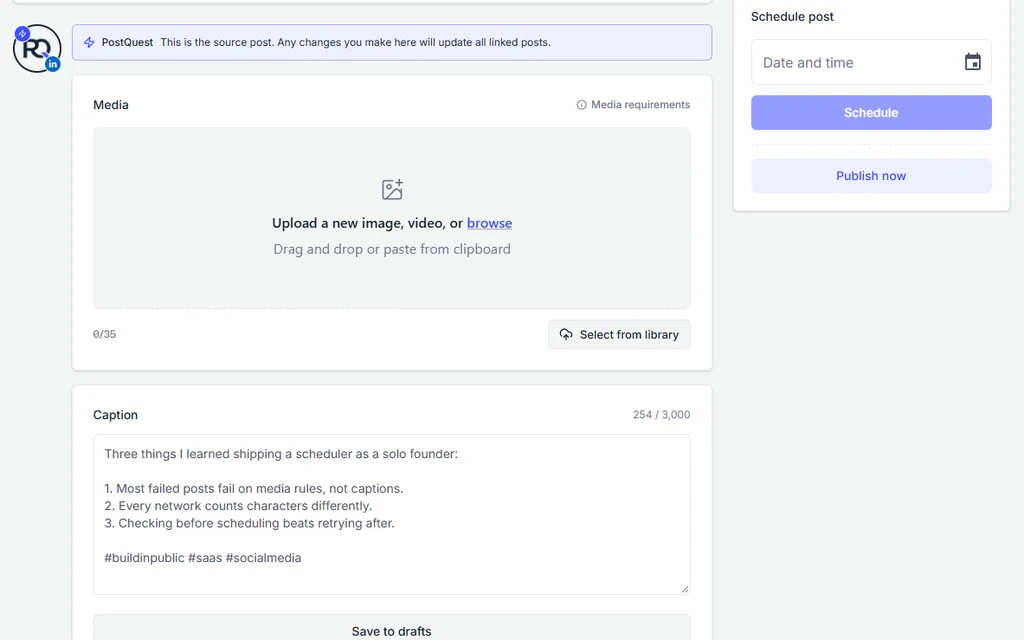
Step 3: Attach photos, a video, or a document
Add up to 20 JPEG or PNG photos, one MP4 video, or one PDF, Word, or PowerPoint document. Document posts need a title, which LinkedIn shows above the preview.
Step 4: Check the requirements
Open Media requirements to see what PostQuest checks for LinkedIn: file types, file sizes, video length and aspect ratio, and the document title rule.
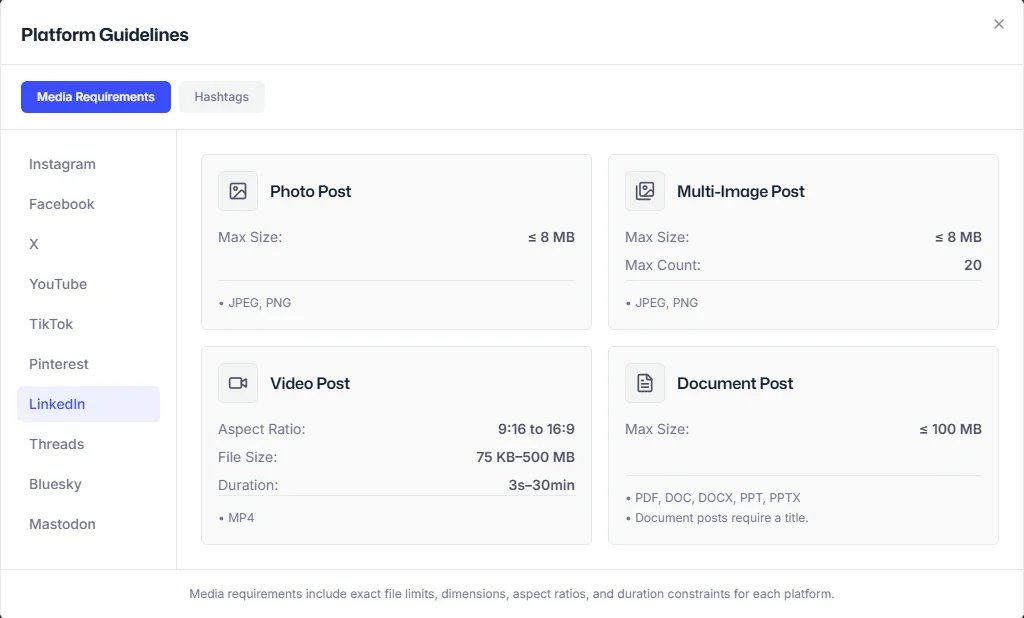
Step 5: Choose a time and schedule
Pick a date and time and click Schedule. Posts that are pending approval wait until someone approves them.
Schedule LinkedIn posts from Claude or ChatGPT
Connect PostQuest to Claude or ChatGPT over MCP and ask for posts in plain language. The assistant creates drafts by default; scheduling, publishing, and deleting need your explicit approval.
“Draft a LinkedIn post for my personal profile from these notes. Use at most three hashtags and keep it as a draft.”
“Write a version of this announcement for the PostQuest company Page and a shorter one for X. Validate both.”
“Show me the LinkedIn posts scheduled for next week.”
Why a LinkedIn post fails, and how to fix it
PostQuest catches these before scheduling, so you fix them in the composer instead of finding a failed post later.
- A document post without a title
- LinkedIn requires a title on document posts. Add one in the composer before scheduling.
- WebP or GIF images
- LinkedIn photo posts accept JPEG and PNG files up to 8 MB. Convert the image first.
- A video longer than 30 minutes or not in MP4
- LinkedIn videos must be MP4, three seconds to 30 minutes long, between 75 KB and 500 MB, with an aspect ratio from 9:16 to 16:9.
- More than 20 photos
- A multi-image post takes two to 20 photos. Split larger sets, or turn them into a PDF document post.
- Text over 3,000 characters
- PostQuest won’t schedule a LinkedIn post over 3,000 characters. Shorten the LinkedIn version; your other networks keep their own captions.
Pricing
Every plan includes all ten networks, the calendar, pre-publish checks, the public API, and the MCP connection for Claude and ChatGPT. Start with a seven-day free trial; no card required.
Solo
$15 / month
or $150 billed yearly
8 connected accounts, 1 workspace
Pro
$29 / month
or $290 billed yearly
20 connected accounts, 3 workspaces
Agency
$69 / month
or $690 billed yearly
60 connected accounts, 15 workspaces
LinkedIn scheduler FAQ
Can you schedule LinkedIn posts for free?
Yes. LinkedIn’s composer has a clock icon that schedules profile posts 10 minutes to three months ahead, and Page admins can schedule Page posts one hour to three months ahead. PostQuest has a seven-day free trial but no free plan.
Can PostQuest schedule posts to a LinkedIn company Page?
Yes. Connect LinkedIn with an account that is an admin of the Page with permission to post, such as a super admin or content admin. The Page then appears as its own account in the composer.
Can I schedule LinkedIn document or carousel posts?
Yes. PostQuest schedules document posts from PDF, Word, or PowerPoint files up to 100 MB, as long as you add a title. It also schedules multi-image posts with two to 20 photos, which LinkedIn’s own Page scheduler doesn’t support.
Can I schedule LinkedIn polls?
No. PostQuest doesn’t support polls, events, or job posts. Create those directly on LinkedIn; LinkedIn’s Page scheduler can’t schedule polls either.
Can Claude or ChatGPT schedule LinkedIn posts?
Yes, through PostQuest’s MCP connection. The assistant can draft posts for your profile or Pages and validate them against LinkedIn’s limits. It asks for your approval before scheduling, publishing, or deleting anything.
Keep planning
- LinkedIn image and video specs for every format PostQuest publishes.
- The best time to post on LinkedIn, based on published engagement studies.
- Connect Claude to PostQuest to draft posts from a conversation.
Schedule your first LinkedIn post
Connect LinkedIn, write once, and let PostQuest check the post before it goes on the calendar.