Bluesky scheduler for posts, images, and video
PostQuest is a Bluesky scheduler for text posts, link posts, up to four images, and video. You write the post, add media and alt text, and pick a time. Before the post is scheduled, PostQuest checks the text against Bluesky’s 300-character limit and every file against Bluesky’s media rules.
The official Bluesky app can save drafts but can’t schedule posts, so you need a third-party tool to post at a set time. PostQuest puts Bluesky on the same calendar as X, Threads, Mastodon, and LinkedIn.
- Accounts
- Bluesky accounts
- Post types
- Text Post, Link Post, Photo Post, Carousel Post, Video Post
- Caption limit
- 300 graphemes
- Price
- From $15 a month
- Seven-day free trial, no card required
Last verified
What you can schedule on Bluesky
PostQuest checks every Bluesky post against these limits before it is scheduled. They come from the same rules that power the composer, last checked against Bluesky’s API documentation on September 11, 2026.
| Format | Files | Limits |
|---|---|---|
| Text Post | No media | Caption only |
| Link Post | No media | Caption only |
| Photo Post | 1 file | Up to 1 MB · JPEG, PNG, WebP |
| Carousel Post | 2–4 files | Up to 1 MB · JPEG, PNG, WebP |
| Video Post | 1 file | Up to 100 MB · 1 s–3 min · MP4, MOV |
Captions can be up to 300 graphemes. Hashtags: no hard limit. See every dimension, aspect ratio, and codec on the Bluesky post size and specs page.
the Bluesky app vs PostQuest
The official Bluesky app has drafts but no post scheduler. The request for scheduled posts has been open on Bluesky’s GitHub since July 2024, and Bluesky’s own blog points people to a third-party scheduler for timed posts.
| Feature | the Bluesky app | PostQuest |
|---|---|---|
| Price | Free | From $15 a month after a seven-day trial |
| Scheduling | Not available; drafts only | Any future date and time |
| Formats | Text, up to 4 images, and video | Text, link, and photo posts, 2 to 4 images, and video up to 3 minutes |
| Alt text | Yes | Yes, for images and video |
| Other networks | Bluesky only | Nine more, including X, Threads, and Mastodon |
| AI assistants | Not part of this comparison | Claude and ChatGPT draft and schedule over MCP, with your approval |
Bluesky can’t schedule posts on its own, so the choice is between posting by hand and using a scheduler. Use PostQuest if you want Bluesky on one calendar with your other networks and every post checked against Bluesky’s limits.
Which Bluesky accounts can you connect?
Connect with your Bluesky handle and an app password, which you create in Bluesky’s settings. You never give PostQuest your main Bluesky password.
- Create a separate app password for PostQuest, so you can revoke it in Bluesky at any time without changing your main password.
- Each Bluesky account counts as one account on your plan.
- If you delete the app password, the account shows Reconnect. Failed posts can be retried once you connect a new one.
How to schedule Bluesky posts in PostQuest
Step 1: Create an app password
In Bluesky’s settings, create an app password named PostQuest. Use it only for PostQuest.
Step 2: Connect your Bluesky account
Open Connections, choose Bluesky, and enter your handle and the app password. Repeat for each account you manage.
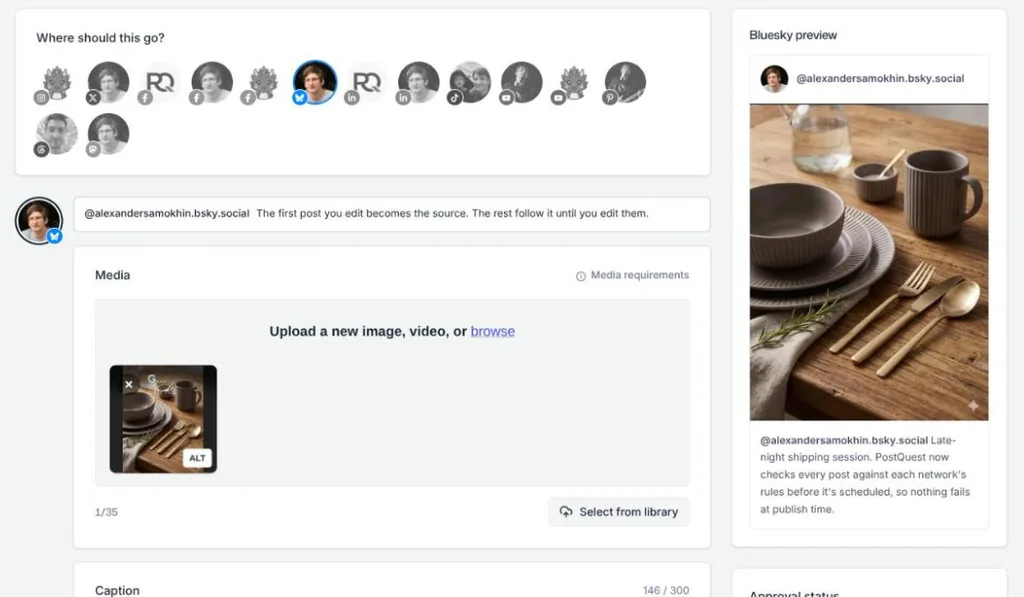
Step 3: Write the post
Select the Bluesky account in the composer and write up to 300 characters. Bluesky counts each emoji as one character.
Step 4: Add images or a video
Attach up to four JPEG, PNG, or WebP images of 1 MB or less, or one video up to 3 minutes and 100 MB. Add alt text so the post is accessible.
Step 5: Choose a time and schedule
Pick a date and time in your workspace time zone and click Schedule. You can change the post until it publishes.
Schedule Bluesky posts from Claude or ChatGPT
Connect PostQuest to Claude or ChatGPT over MCP and ask for posts in plain language. The assistant creates drafts by default; scheduling, publishing, and deleting need your explicit approval.
“Write a Bluesky post under 300 characters announcing our new feature, with alt text for the screenshot, and save it as a draft.”
“Make Bluesky and Mastodon versions of this X post and validate them.”
“Schedule the approved Bluesky post for Monday at 10 a.m. Amsterdam time.”
Why a Bluesky post fails, and how to fix it
PostQuest catches these before scheduling, so you fix them in the composer instead of finding a failed post later.
- Text over 300 characters
- Bluesky posts are capped at 300 characters. Shorten the Bluesky version; your other networks keep their own captions.
- An image over 1 MB
- PostQuest accepts Bluesky images up to 1 MB as JPEG, PNG, or WebP. Compress or resize the image before scheduling.
- More than four images
- A Bluesky post takes up to four images. Pick the strongest four or split them across two posts.
- A video longer than 3 minutes
- PostQuest schedules Bluesky videos up to 3 minutes and 100 MB. Trim the video before scheduling.
- The app password was deleted
- Create a new app password in Bluesky, reconnect the account in Connections, then retry the failed post.
Pricing
Every plan includes all ten networks, the calendar, pre-publish checks, the public API, and the MCP connection for Claude and ChatGPT. Start with a seven-day free trial; no card required.
Solo
$15 / month
or $150 billed yearly
8 connected accounts, 1 workspace
Pro
$29 / month
or $290 billed yearly
20 connected accounts, 3 workspaces
Agency
$69 / month
or $690 billed yearly
60 connected accounts, 15 workspaces
Bluesky scheduler FAQ
Can you schedule posts on Bluesky?
Not in the official Bluesky app, which only saves drafts. To post at a set time you need a third-party scheduler such as PostQuest, which stores the post and publishes it to Bluesky when the time comes.
Do I need to give PostQuest my Bluesky password?
No. You connect with an app password that you create in Bluesky’s settings just for PostQuest. You can delete it in Bluesky at any time to cut off access, without changing your main password.
Can I add alt text to scheduled Bluesky posts?
Yes. Add alt text to each image or video in the composer, and PostQuest sends it with the post. Bluesky shows it to people using screen readers and to anyone who taps the ALT badge.
Is there a free Bluesky scheduler?
Bluesky itself has no scheduler, free or paid. Several third-party schedulers support Bluesky, and some have free plans. PostQuest has a seven-day free trial but no free plan.
Can Claude or ChatGPT schedule Bluesky posts?
Yes, through PostQuest’s MCP connection. The assistant can draft Bluesky posts, check them against the 300-character limit, and schedule them once you approve.
Keep planning
- Bluesky image and video specs for every format PostQuest publishes.
- Connect Claude to PostQuest to draft posts from a conversation.
Schedule your first Bluesky post
Connect Bluesky, write once, and let PostQuest check the post before it goes on the calendar.